You spend twenty minutes crafting a prompt that works beautifully in ChatGPT. You paste the same text into Claude. The output is completely different, more hedged, differently structured, and sometimes missing the point entirely. You try Gemini and get something else altogether.
This isn't a bug. It's the nature of how different models are trained, what they optimize for, and how they interpret instructions. But it is a problem especially if your team is working across multiple AI tools, or if you're building a prompt library you want to stay useful as the model landscape shifts.
The good news: there's a small set of structural habits that reliably produce consistent, high-quality outputs regardless of which model you're using. This guide breaks them down.
Why the Same Prompt Gets Different Results on Different Models
Before we fix the problem, it's worth understanding it. Claude, ChatGPT, and Gemini differ in three meaningful ways that affect how they interpret prompts.
Training data and fine-tuning philosophy.
Each model has been shaped by different combinations of RLHF (reinforcement learning from human feedback), constitutional AI methods, and fine-tuning objectives. Claude is optimized heavily for helpfulness, harmlessness, and nuanced reasoning. ChatGPT (GPT-4o) leans toward conversational fluency and task completion. Gemini emphasizes multimodal capability and factual grounding. These differences mean the same vague instruction gets interpreted through different lenses.
Default verbosity and tone.
Claude tends to be more thorough and caveated. ChatGPT tends to be more direct and action-oriented. Gemini sits somewhere in between but is more likely to structure responses with headers and bullets. If your prompt doesn't specify format and length, each model fills in the blanks differently.
How they handle ambiguity.
When a prompt is underspecified, models make different assumptions to fill the gaps. Claude often asks clarifying questions or hedges its answer. ChatGPT makes a confident best guess. Gemini may surface multiple interpretations. If you're not explicit, each model picks a different default.
The fix isn't to write three different versions of every prompt. It's to write prompts that leave no room for these differences to matter.
The 5 Principles of Model-Agnostic Prompting
1. Always Specify the Role, Not Just the Task
Most prompts start with the task: "Write a summary of this article." Model-agnostic prompts start with the role: "You are a senior editor at a business publication. Summarize this article..."
Role framing does two things. First, it compresses a lot of implicit instructions like tone, vocabulary level, perspective, and level of detail into a single line that every model interprets consistently. Second, it reduces the variance in how different models fill in unspecified details, because they're all anchoring to the same persona.
Less consistent:
Summarize this report for our leadership team.
More consistent:
You are a chief of staff preparing a briefing for a C-suite leadership team.
Summarize the following report in 5 bullet points. Each bullet should surface
one decision-relevant insight. Use plain language, no jargon.
2. Make the Output Format Explicit and Structural
Every major model will default to different output formats when you don't specify one. Claude may write flowing prose with explanatory paragraphs. ChatGPT may use numbered lists. Gemini may use headers with sub-bullets.
The solution is to define the output structure inside the prompt itself — not as a vague instruction ("be concise") but as a schema.
Less consistent:
Give me feedback on this email draft.
More consistent:
Review the email draft below and return your feedback in this exact format:
Tone: [1-sentence assessment]
Clarity: [1-2 sentences on what's unclear or could be simplified]
Call to action: [Is the ask clear? Yes/No + one sentence of explanation]
Suggested edits: [Up to 3 specific line-level changes, each on a new line]
When you give the model a template to fill, you eliminate format variance. The output structure becomes your design, not the model's default.
3. Use Constraints, Not Just Instructions
Instructions tell the model what to do. Constraints tell the model what not to do and they're often more powerful for achieving consistency.
Common constraints that matter:
Length: "In exactly 3 sentences." or "Under 150 words." not "Be brief."
Scope: "Only use information from the text I provide. Do not add external knowledge."
Tone: "Do not use hedging language like 'it's important to note' or 'it's worth considering'."
Format: "Do not use bullet points. Write in continuous prose."
Perspective: "Do not include your own opinion or recommendations. Only describe what the data shows."
Claude in particular will often add caveats and qualifications unless you explicitly tell it not to. ChatGPT will sometimes add unnecessary preamble ("Great question! Here's...") unless constrained. These small differences compound when you're running prompts repeatedly across models.
Example with constraints:
You are a UX copywriter. Write three variations of the headline for this
landing page feature.
Constraints:
- Each headline must be under 10 words
- Do not use the word "powerful" or "seamless"
- Write in second person ("you", not "we")
- No punctuation at the end of headlines
- Each variation should try a different emotional angle: curiosity, urgency, clarity
4. Anchor on Examples, Not Just Descriptions
Telling a model what you want produces variable results. Showing a model what you want with a concrete example dramatically narrows the interpretation space.
This technique is called few-shot prompting, and it's one of the most reliable tools for cross-model consistency because examples bypass the model's subjective interpretation of qualitative instructions.
Without an example:
Write product descriptions in our brand voice. Keep them punchy and benefit-focused.
With an example:
Write product descriptions in our brand voice. Here's an example of the style:
"Stop copying prompts from Reddit threads that don't work. PromptPal gives you a
searchable library of tested, organized prompts — built for how you actually use AI."
Now write a similar description for this feature: [feature details]
The example communicates tone, sentence length, structure, perspective, and attitude in a way that no amount of adjectives can. Claude, ChatGPT, and Gemini will all anchor to the example rather than their own defaults.
5. Separate Instructions from Content with Clear Delimiters
One of the most common sources of cross-model inconsistency is prompt ambiguity the model can't tell where your instructions end and your content begins, so different models make different choices about how to parse it.
Use clear delimiters to separate the instruction layer from the content layer.
Ambiguous:
Rewrite this to be more concise: Our platform helps teams manage and organize their prompts in a collaborative workspace with role-based access controls and
a shared library.
Delimited:
Rewrite the text below to be more concise. Keep the core meaning. Target: under 20 words.
---
Our platform helps teams manage and organize their prompts in a collaborative
workspace with role-based access controls and a shared library.
---
Common delimiter patterns that work across all models:
Triple dashes
---to separate sectionsXML-style tags:
<document>,<context>,<task>Markdown headers:
## Instructions/## ContentTriple backticks for content that should be treated as data, not instructions
This is especially important when your prompt includes long documents, code, or data. Without delimiters, models sometimes treat parts of your content as instructions producing unpredictable results.
Putting It All Together: The Model-Agnostic Prompt Template
Here's a reusable template structure that applies all five principles:
[ROLE]
You are a [specific role] at [context, if relevant].

[TASK]
[One clear sentence describing what you need.]

[CONSTRAINTS]
- [Constraint 1]
- [Constraint 2]
- [Constraint 3]

[OUTPUT FORMAT]
Return your response in this format:
[Define the structure explicitly]

[EXAMPLE] (optional but powerful)
Here's an example of what I'm looking for:
[Example output]

[CONTENT]
---
[Paste your content, document, or data here]
---
This template works because it separates every layer of instruction into explicit, unambiguous sections. There's no room for models to fill in defaults differently; every decision has been made for them.
The Real Advantage: A Prompt Library That Works Everywhere
Writing model-agnostic prompts manually every time is still friction. The real leverage comes when you save these structured prompts in a library so you (or your team) can grab a tested, consistently-performing prompt and run it on whichever model you're using that day.
This is exactly what a tool like PromptPal is designed for. Instead of re-engineering the same prompt each time you switch models, you maintain one library of structured, constraint-rich prompts that have been tested and refined. Your team members don't need to be prompt engineers; they pull from the shared library, fill in the content section, and run it.
For teams using multiple AI tools, which is the majority of serious AI users in 2026, this is the difference between a prompt strategy and a prompt habit. Habits break when the tool changes. Strategies survive it.
Common Mistakes That Create Cross-Model Inconsistency
Relying on conversational context. Claude in particular is good at maintaining long conversational threads and building on what was established earlier. ChatGPT is less reliable here. If your prompts depend on "remember when I said..." context, they won't transfer. Always write prompts that are self-contained.
Using qualitative adjectives without anchors. "Professional," "concise," "creative," "casual" — these mean different things to different models. Always pair them with examples or metrics. "Concise (under 80 words)" is cross-model consistent. "Concise" is not.
Leaving the audience unspecified. "Explain this" will produce a PhD-level explanation on Claude and a simplified overview on ChatGPT if you don't specify who the explanation is for. Always add: "Explain this to [audience description]."
Not testing across models. The fastest way to audit your prompt library for cross-model robustness is to run your most-used prompts on two different models simultaneously and compare. The gaps you find are exactly where your prompts need more structure.
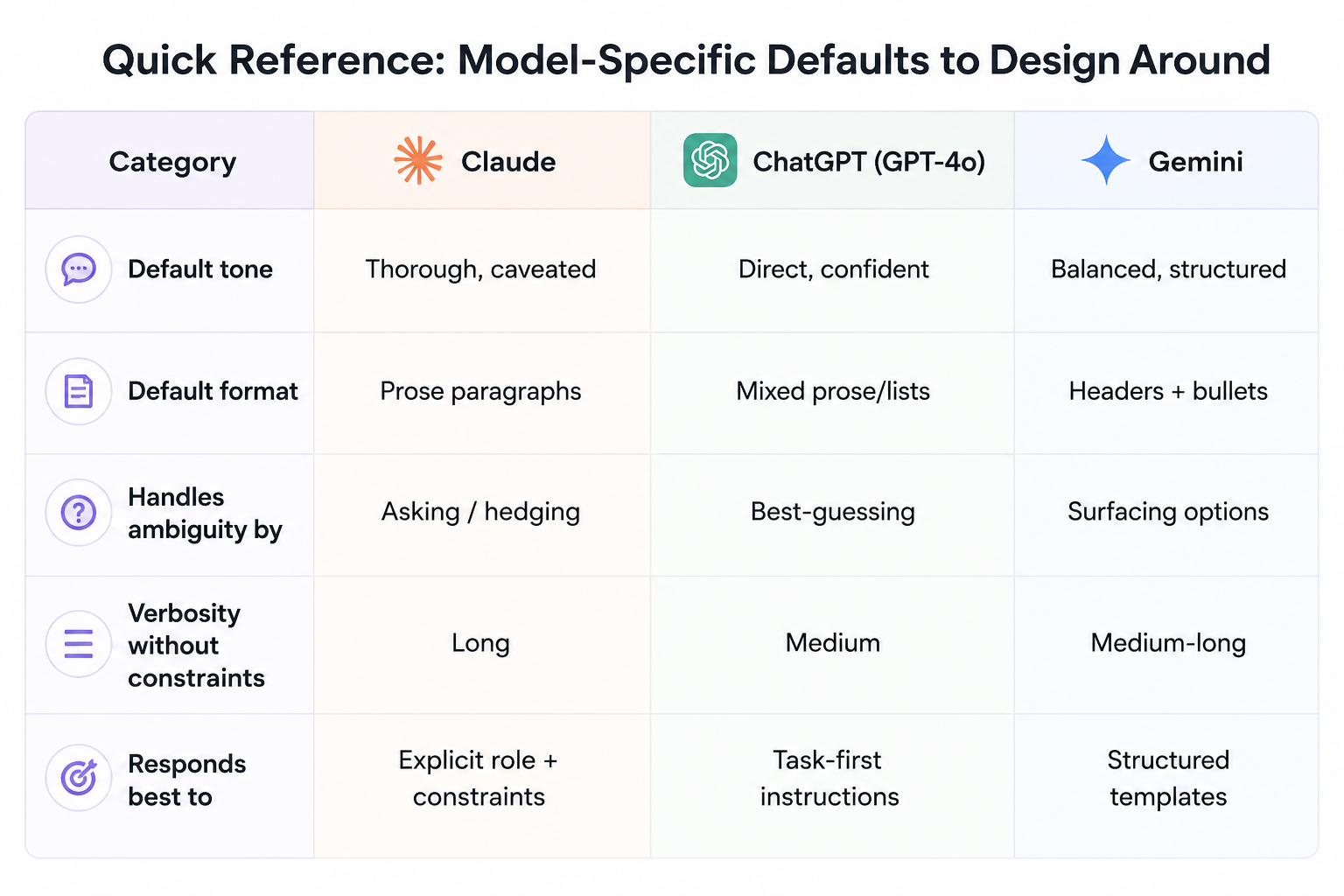
model comparison image
Use this table to anticipate where a prompt might break across models and which constraint to add to fix it.
The Takeaway
Consistent AI results aren't about finding the best model. They're about writing prompts that don't depend on any single model's defaults. Role framing, explicit output schemas, constraint layers, few-shot examples, and clear delimiters: these five habits eliminate the variance that makes switching between Claude, ChatGPT, and Gemini feel like starting over.
Once your prompts are structured this way, they belong in a library. Not in a doc, not in a Notion page, not in a browser bookmark, but in a searchable, shareable workspace where every version of every prompt is organized, accessible, and ready to run.
That's what a prompt library is actually for.
Save your best model-agnostic prompts in PromptPal. Organize them by use case, share them with your team, and refine them over time so every model you use works like it was built for your workflow. Start free →
Stay Updated
Get the latest blog posts and AI prompt engineering tips delivered to your inbox.